
How to Audit Your Team's Email Signatures (With a Copy-Paste Email Template)
Drafted with AI assistance and reviewed before publishing. How we write and source articles →
TL;DR: You don’t need a tool, a project plan, or IT’s help to find out how inconsistent your organisation’s email signatures actually are — just five minutes and one email. Send the template below to a handful of colleagues, ask them to forward you a blank new email (not a reply) so you see their true default signature, and look at what comes back. Most people are surprised by how bad it is.
If you manage brand, compliance, or IT for your organisation, you probably already suspect your team’s email signatures are a mess. Someone forwarded you a client thread recently where three people had three completely different sign-offs. Or you noticed your own signature still has last year’s job title on it.
The suspicion is usually right. What’s harder is knowing the actual scale of it — how many variations exist, which ones are missing something they legally shouldn’t be missing, and whether this is a five-minute fix or a genuine, ongoing problem. You can’t fix — or even properly describe — a problem you haven’t measured.
This is how to measure it, without buying anything or asking IT to build you a report.
Why this is worth five minutes of your time
The average office worker sends 40 or more emails a day, according to research from The Radicati Group, a technology market research firm that tracks global email usage. For a team of 50 people, that’s roughly 2,000 outbound emails a day carrying whatever signature each person happens to have set up — correctly or otherwise.
Every one of those is a brand impression, a compliance data point, or both. A prospect who gets three different-looking emails from three people at your company in the same week notices, even if they never say anything. A missing legal disclaimer on an external email is a compliance gap the day it’s sent, not just when someone happens to check. You’re not auditing for the sake of it — you’re finding out how many of those 2,000 daily impressions are currently working against you rather than for you.
The audit: one email, sent to your team
You don’t need special access to anyone’s mailbox and you don’t need a survey tool. You need each person’s actual current signature, exactly as it appears when they send a real email — not what they think it looks like, not what the company handbook says it should look like.
The reliable way to get that is to ask for a blank new email rather than a reply. Outlook (and most other mail clients) lets people set one signature for new messages and a different, often shorter, one for replies — so if you ask someone to just “hit reply and tell me what your signature looks like,” you may well get the wrong one. Asking for a fresh, blank compose sidesteps that entirely: whatever appears is genuinely what goes out on a first email to a new contact, which is the version that matters most.
Here’s a template you can copy, paste, and send as-is:
Subject: Quick favour — 10 seconds, no reply needed
Hi [name],
I’m doing a quick check of how our email signatures currently look across the team — nothing for you to fix, I just need to see what’s actually there right now.
Could you open a new email in Outlook (not a reply to this one — a fresh new message), and once your signature auto-fills in, just forward that blank email straight to me? No need to write anything.
That’s it — should take about 10 seconds. I’ll explain what this is for once I’ve heard back from everyone.
Thanks, [Your name]
Two things make this template work, and worth keeping if you adapt it:
It explains what you’re doing and why. People are more likely to actually do this — and do it properly, without adding a line explaining that their “real” signature looks different — when they know it’s a genuine internal check, not a random request. You don’t owe anyone a full brief, but a one-line reason removes the awkwardness of a manager suddenly asking for their signature out of the blue.
It asks for the least possible effort. No form, no screenshot, no describing their signature in words. Open new email, forward, done. The lower the friction, the higher your reply rate and the less selection bias in what comes back — if only the most conscientious people reply, you’ll undercount the problem.
Send it to a genuine cross-section, not just the people you already suspect have a messy signature — sales, support, ops, a couple of senior people, a couple of recent starters. Ten to fifteen replies is usually enough to see the real pattern in an organisation of any size; you’re establishing that variation exists and roughly how much, not building a complete inventory.
What to look for once replies land
Once you’ve got a handful of signatures side by side, go through them against five things:
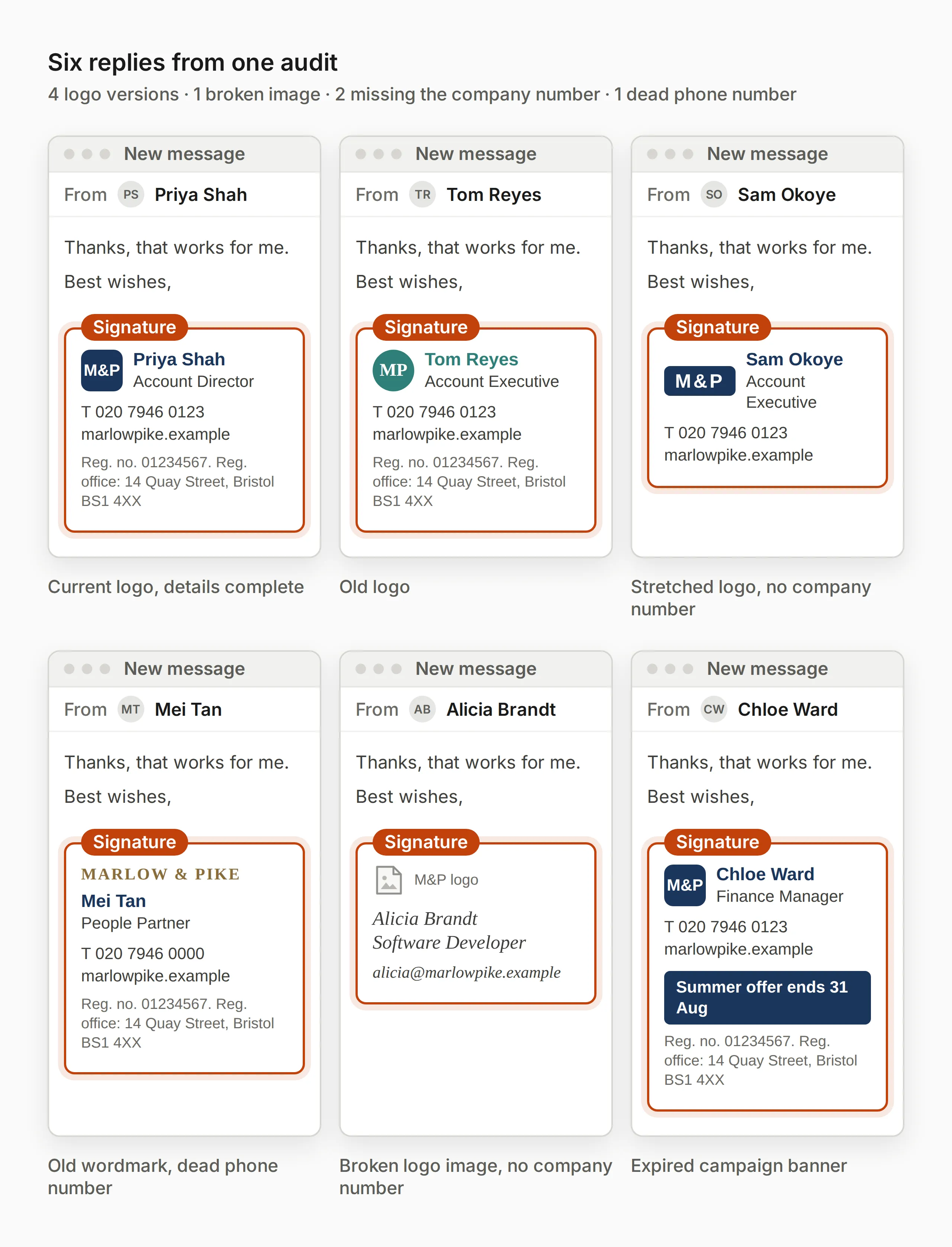
Consistency. Logo present and current version, correct brand colours, the same font (or at least a font from the same family), the same layout and field order. Count how many genuinely distinct “designs” you’re looking at — not people with one field different, but actually different templates.
Compliance exposure. UK limited companies are legally required to include their registered company name, number, and registered office address on external business emails, under the Companies Act 2006 — see our full breakdown of UK email footer requirements for what applies to your sector specifically. Some regulated sectors (financial services, legal) have additional disclosure rules on top of that. Check how many of your replies are missing something they’re legally required to have, not just something that looks unprofessional.
Lifecycle accuracy. Old job titles, phone numbers for lines that no longer exist, a “book a demo” link that 404s, a logo that shows as a broken image because the file it pointed to has moved, a leftover banner for a campaign that ended eight months ago. This tells you how signatures actually get maintained once someone sets them up — usually: they don’t.
Brand agility. If you needed everyone’s signature updated today — a new phone number, a rebrand, a legal wording change — how would that actually happen for the people in front of you? Would you have to email each of them individually and hope? That’s your real answer to “how fast can we change this,” and it’s usually much slower than anyone assumed before running the audit.
Ownership. For each inconsistency you find, ask who’s actually responsible for it. If the honest answer is “no one, really — everyone just does their own thing,” that’s the root cause showing up directly, and it’s worth reading why this happens structurally, not through anyone’s carelessness.
You don’t need a scoring system or a spreadsheet template for this. A short list — “6 replies, 4 different logo versions, 1 broken image, 2 missing the company registration number, 1 with a dead phone number” — is usually all it takes to make the case to whoever needs to see it.
What to do with the results
Once you’ve got a clear picture, the next steps depend on what you found:
- If the variation is mostly cosmetic (fonts, layout, minor formatting drift), you’re looking at a brand consistency problem — read why “just send everyone a template” doesn’t actually fix this for long before you try the obvious fix.
- If you found genuine compliance gaps (missing legal disclaimers, out-of-date regulatory wording), treat that as more urgent than the cosmetic issues — see the UK compliance requirements breakdown for what specifically needs to be there.
- If no one could clearly answer “who owns this,” that’s the conversation to have before anything else. A design fix without an owner just drifts back to where you started within a few months.
The audit itself doesn’t fix anything — it just replaces a vague sense that “our signatures are probably a bit inconsistent” with an actual count you can act on, or put in front of whoever holds the budget.
Frequently asked questions
How many people should I include in the audit?
There’s no fixed number, but ten to fifteen replies across different teams and tenures is usually enough to see the real pattern — you’re establishing that meaningful variation exists and roughly how widespread it is, not building an exhaustive inventory of every signature in the company. For organisations under about 20 people, it’s often worth just asking everyone.
What if some colleagues don’t reply?
Send one polite follow-up after a few days, then work with what you have. A partial response is still informative — if 8 out of 12 replies show meaningful variation, that’s already a strong enough signal to act on. Chasing 100% completion usually isn’t worth the effort for a first-pass audit.
Does this work for Gmail and Google Workspace, not just Outlook?
Yes — the same logic applies. Ask for a blank new email rather than a reply, since Gmail also supports separate signatures for new messages versus replies in some configurations. The exact menu path differs from Outlook, but “open a new compose window and forward what appears” works the same way.
Is a manual audit like this good enough, or do I need a tool?
For a first pass — finding out whether you have a real problem worth solving — this is genuinely enough. It becomes impractical at scale: chasing replies from 200 people by hand, re-running the check every few months, and cross-referencing results against a compliance checklist is a lot of manual admin. At that point it’s less about needing better data and more about needing the ongoing process to not depend on someone remembering to do this again next quarter.
What’s the difference between this and checking whether people are using an approved signature?
This audit is for organisations that don’t yet have one agreed, enforced signature — it’s about discovering how much variation currently exists, as a first step. If your organisation already has an approved standard and you specifically want to check who’s actually using it correctly, that’s a related but different exercise, closer to a compliance spot-check than a discovery exercise.