
Why Your Team's Emails All Look Different
Drafted with AI assistance and reviewed before publishing. How we write and source articles →
TL;DR: Every person on your team sets their own email signature independently, which means no two will look the same for long. It is not a people problem — it is a structural one. The only reliable fix is central management.
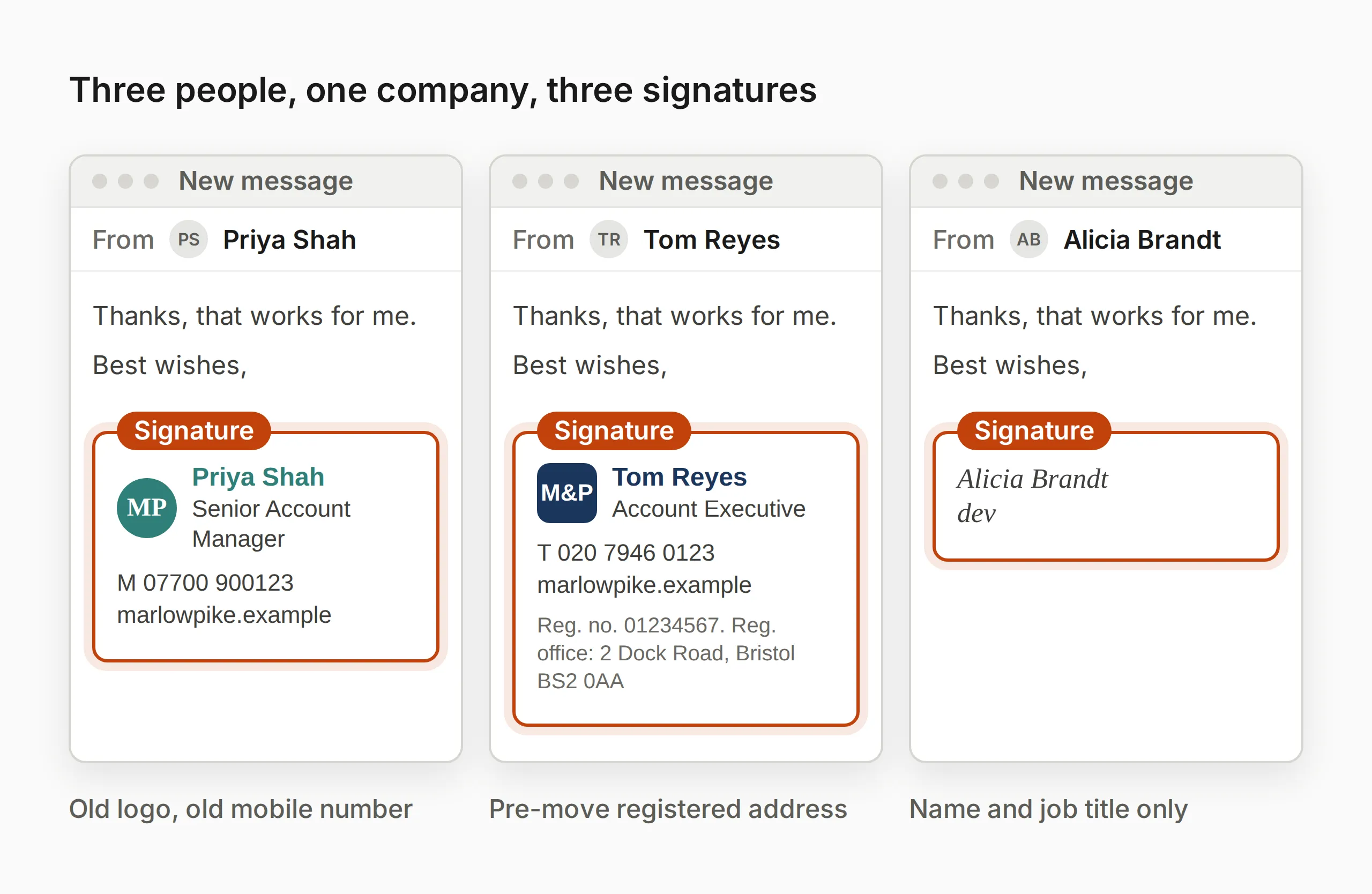
You noticed something. Maybe it was in a reply chain, where three different colleagues each had a completely different signature. One had a logo. One had no logo but a mobile number in an unexpected format. One had a quote from a motivational speaker set in a font that looked like it belonged on a greetings card.
Or maybe a client pointed it out. Or you were about to forward a proposal thread and realised it looked like it came from four different organisations.
However you got here, you are now thinking about email signature consistency — and wondering why it is so hard to fix.
The answer is straightforward. Once you understand it, the solution becomes obvious too.
The root cause: everyone controls their own
In most organisations, email signatures are set by each individual inside their own email client. In Outlook, that means navigating to File → Options → Mail → Signatures and typing whatever they like. Nothing prevents anyone from using Comic Sans, adding an animated GIF, or including a quote they found on LinkedIn.
This is not a failure of your team. It is the default behaviour of email software. Email clients are designed for individuals, not organisations. The ability to enforce a consistent signature across every account — automatically — is not a built-in feature of Microsoft 365 or Google Workspace. It requires something deliberate.
So unless your organisation has actively put a central management system in place, what you have is dozens or hundreds of individually maintained signatures. And individually maintained signatures will always drift apart over time.
The scale of the problem is larger than it looks
Here is what makes this worth taking seriously.
On a planning assumption of 40 emails sent per person per working day (how that is calculated, and its limits), a 50-person team sends around 2,000 emails a working day — roughly half a million a year, a share of them to people outside the company.
Every single one of those emails carries a signature. If those signatures are inconsistent — different logos, different fonts, outdated job titles, missing phone numbers, clashing colours — then every one of those emails is an inconsistent brand impression landing in someone’s inbox.
That is not an abstract concern. Email is one of the most frequent ways your company touches the outside world. It reaches clients, prospects, partners, and suppliers. It is read, forwarded, replied to, and searched months after it was sent. A professional, consistent signature is a minor thing on a single email. Across half a million emails a year, it is either a meaningful brand asset or a meaningful liability.
What inconsistency actually looks like in practice
Inconsistent email signatures tend to show up in the same ways across most organisations:
Different logos, or no logo at all. Some people added it when the image was circulated a few years ago. Some people have an older version. Some never added it, or lost it when they got a new laptop.
Different job titles. People use informal titles, titles from a previous role, or titles that do not match what appears on the website or in contracts.
Different contact details. Some signatures have a direct line. Some have the main office number. Some have a mobile. Some have no phone number at all.
Different formatting. Some people use the company font. Some do not know what the company font is. Some have gone off-script entirely.
Missing legal information. UK limited companies are legally required to include their registered company name, number, and registered office address on all external business emails — a requirement under the Companies Act 2006. If signatures are individually managed, some people will have this and some will not. That is a compliance issue, not just a design one.
The cumulative effect is that your outbound email, as a whole, does not look like it comes from a single organisation.
Why “just send a template” does not work
The obvious first instinct is to fix it the simple way: design a good signature, send it to everyone, ask them to update, and follow up with anyone who has not.
This usually works for about a fortnight.
The problems are structural:
- People set it up incorrectly — wrong font size, wrong spacing, image not displaying
- New starters join and no one remembers to set them up
- Someone reinstalls Outlook or gets a new device and loses their signature
- People gradually edit it — adding things, removing things, updating details that then go stale elsewhere
- Mobile devices are almost never covered, and most people send a meaningful proportion of email from their phones
A template approach treats the signature as a one-time configuration task. It has to be repeated for every new starter, every device change, every role change, every rebrand. It does not scale beyond a handful of people, and even at small team sizes it is always at least partially out of date.
What central management looks like
The alternative is to take the signature out of each person’s control entirely and manage it from one place.
Signature management tools — several exist, at different price points and with meaningfully different technical approaches — let an IT admin or marketing manager define the standard signature once and push it to every account automatically. Individual employees cannot edit it. It just appears when they send email, correctly formatted, every time.
The practical result:
- Everyone’s signature looks the same, always
- New starters get the correct signature from their first day without anyone having to do anything
- Job title changes and rebrand updates are made in one place and roll out immediately across the whole organisation
- Legal requirements are met consistently across every account
- Mobile email is covered
For a fuller look at what a managed signature programme can do for brand consistency — and how to think about the design decisions involved — see Email Signature Branding: Turn Emails Into a Brand Asset.
If you want to understand the technical side — how signature management tools actually work inside Microsoft 365, and why the architecture matters for GDPR — How to Manage Email Signatures Across a Company covers the landscape in detail.
What to do next
If you are dealing with inconsistent email signatures right now, the practical path is:
- Audit what you have. Ask five people to forward you their current signature. You will almost certainly find four different versions — see how to run this properly, with a copy-paste email template if you want to do it right the first time.
- Define the standard. Work with your design or marketing team to agree on a single template — logo, fonts, colours, which contact details are included, and in what order.
- Decide how to manage it. For very small teams with low turnover, a well-enforced template policy and a disciplined IT setup process may be sufficient. For teams of 20 or more, or anyone with a genuine brand requirement, a central management tool is almost always worth it.
- Involve IT early. Central signature management sits at the intersection of marketing and IT infrastructure. The sooner IT is involved, the smoother the rollout.
Frequently asked questions
Why don’t email clients enforce a standard signature automatically?
Email clients are designed for individual users, not for organisations. Signature control is intentionally left to the individual. Central enforcement requires either Exchange transport rules (which append a footer after sending — so the sender never sees it in the compose window) or a third-party tool that operates within Outlook itself. Neither is built into Microsoft 365 in a way that gives marketing teams control without involving IT.
Does Microsoft 365 have anything built in for this?
Microsoft 365 does have mail flow rules that can append a standard text footer to outbound email at the server level. However, these rules run after the email is sent, so the signature does not appear during composition, images are not reliably supported, and they do not cover all clients. Most organisations that need consistent visual signatures use a third-party tool. For a detailed breakdown, see the IT admin overview.
How many people do you need before central management is worth it?
There is no fixed number. Some ten-person companies have brand requirements that make a management tool worthwhile from day one. Some 100-person companies still rely on templates. The tipping point is usually when manual maintenance — onboarding new starters, handling role changes, applying rebrand updates — becomes a recurring overhead rather than an occasional task.
What about signatures on mobile?
Mobile is where template-based approaches break down most visibly. The Outlook mobile app has limited signature formatting support, and many people send email from the iOS or Android default mail client, which has no connection to their Outlook desktop signature. Central management tools that operate at the add-in level within Outlook can address this — but it is worth asking any vendor specifically how their mobile coverage works before committing.
Is this just a cosmetic problem?
It is a brand problem, a compliance problem, and sometimes a legal problem. Inconsistent branding erodes trust over time. Missing legal information on business emails — required under UK company law — creates genuine regulatory exposure. And in customer-facing roles, a signature that looks unprofessional or out of date affects how clients perceive the organisation. The cosmetic dimension is just the most visible part.