
Professional Email Signature Examples You Can Copy
TL;DR: A professional email signature needs your name, job title, company, one phone number and a website. A UK limited company must also show its registered details on external email. Below are nine examples you can copy, each for a different job. They cover a standard signature, a short reply version, a shared mailbox, sales, leadership, recruiters, part-time staff, regulated firms and plain text. Replace the details in square brackets with your own. If your organisation has a company template, use that instead.
Most signature galleries are about design. This page is about wording. Each example below is plain text, so it works in any email app and you can paste it straight in. For layouts, logos and banners, see the best email signature designs for 2026. For sizes and images, see email signature branding.
What every professional signature needs
Keep it to the details someone needs to reply, call you or find your company:
- Your name, as you want people to use it
- Your job title, so people know what you can help with
- Your company name
- One phone number. Two at most, labelled
- Your website
If you work for a UK limited company, your emails to people outside the company must show more. They need the company’s registered name, registration number, place of registration and registered office address. UK email footer legal requirements explains each one, with templates for regulated firms and charities.
Leave out quotes, long confidentiality notices, a second email address and anything saved as a picture of text. They make the signature longer without helping anyone reply.
One brand, different jobs
Most people need more than one signature. A full one for new emails, a short one for replies and, for teams, one for a shared inbox. They should look like they belong to the same company.
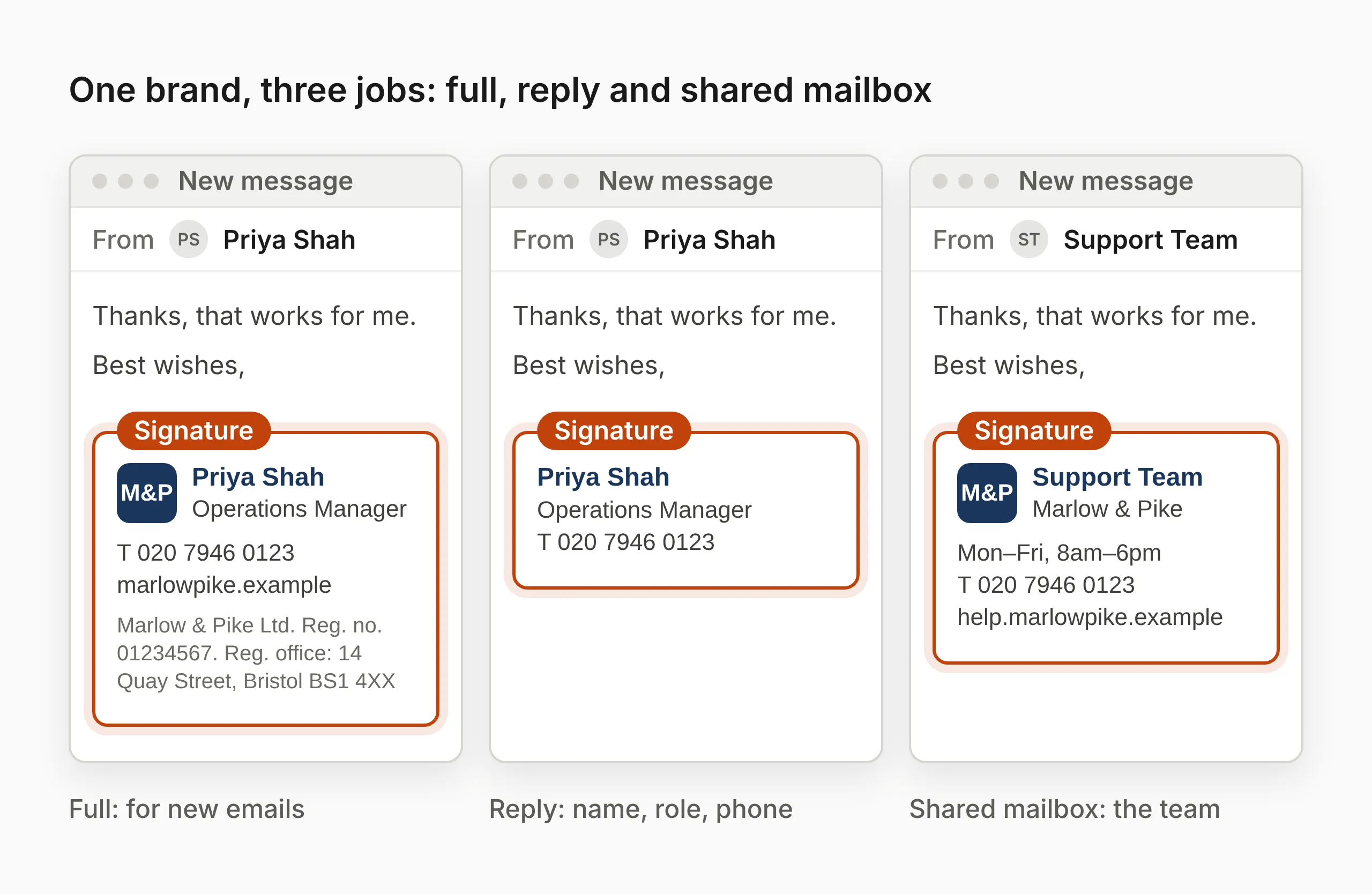
1. The standard signature
Use this for new emails. It suits almost anyone in the organisation.
[Full name]
[Job title]
[Company name]
T [Phone number]
[website.example]

[Registered company name]
Registered in England & Wales
Company number: [XXXXXXXX]
Registered office: [Full address]
The last four lines are the UK company details. If your company is registered in Scotland or Northern Ireland, change “England & Wales” to match the register.
2. The short reply signature
Use this on replies and forwards. In a long thread, a full signature on every message makes the thread hard to read.
[Full name]
[Job title]
T [Phone number]
Outlook and Gmail both let you choose a different signature for replies. How to change your signature in Outlook and the Gmail version show where.
If your company must show its registered details, treat replies to people outside the company the same as new emails. Many companies keep the registered details in a short footer added to every external email, so the reply signature can stay short.
3. A shared mailbox or team signature
Use this for a shared address such as support, accounts or bookings. Name the team, not a person, so the signature stays right when someone else answers.
[Team name]
[Company name]
[Opening hours]
T [Team phone number]
[Help page or booking link]
If staff also sign off with their own first name in the message, that is enough. They do not need their personal signature as well.
4. Sales and account management
Use this for anyone booking meetings. Add one link, not several.
[Full name]
[Job title]
[Company name]
T [Phone number]
M [Mobile number]
Book a call: [booking link]
The booking line does the work a banner would do, and it still works when the reader’s email app blocks images. Sales email signature best practice covers how to track it.
5. Leadership
Senior staff usually need less, not more. A short signature reads as confident.
[Full name]
[Job title], [Company name]
[website.example]
Leave out a direct line if an assistant handles calls. Add the assistant’s name and number instead, under the website line:
Assistant: [Name]
T [Phone number]
6. Recruiters and HR
Candidates want to know who you are and what happens next. A link to your careers page helps more than a slogan.
[Full name] ([pronouns, optional])
[Job title], People team
[Company name]
T [Phone number]
Current roles: [careers page link]
Email signatures for HR teams covers signatures for new joiners and recruiting campaigns. Pronouns in email signatures explains how to add pronouns well.
7. Part-time and flexible working
If you do not work every day, say so in the signature. It saves people waiting for a reply that will not come until tomorrow.
[Full name]
[Job title]
[Company name]
T [Phone number]
I work Monday to Thursday.
Urgent queries: [name or team email]
Keep it to one line, and update it if your pattern changes. An out-of-office reply covers holidays. This line covers your normal week.
8. Regulated firms
Some firms must add a statement from their regulator. For example, firms authorised by the Financial Conduct Authority (FCA) or the Solicitors Regulation Authority (SRA) usually add their status and registration number.
The exact wording depends on how your firm is regulated, so copy it from the source rather than from a gallery. UK email footer legal requirements has templates for FCA firms, appointed representatives, law firms and charities. For other countries, see email signature and disclaimer law by country.
9. The plain-text version
Some emails are sent as plain text, with no formatting or images. A plain-text signature should still be readable on its own.
--
[Full name]
[Job title], [Company name]
T [Phone number]
[website.example]
The first line is two dashes followed by a space. It is a long-standing way to mark where a signature starts. Many email apps use them to hide or trim the signature in replies. Gmail adds them automatically unless you choose to put your signature above quoted text.
Turning an example into one template for everyone
Copying an example works for one person. For a whole organisation, pick one layout for each job above and fill it in automatically, so nobody has to type their own details.
- In Microsoft 365, a signature tool or script can fill in the name, job title and phone number from each person’s directory record. Centralised email signatures in Microsoft 365 explains the options.
- In Google Workspace, the same is possible through the Gmail API or a signature tool. How to manage email signatures in Google Workspace covers each route.
- Check the directory first. An automated signature is only as good as the details behind it. Why your email signatures are wrong shows the gaps to look for.
Before you roll a template out, send test emails to yourself and to a colleague who uses a different email app. Check them on a computer and on a phone. Check that nothing wraps or goes missing. The best email signature designs lists the apps worth checking.
Frequently asked questions
Should my email address be in my signature?
It is optional, because the recipient can already see it. It is still worth including if your emails are often forwarded or printed, because the address can get lost along the way. If you send from a shared mailbox, put the team address in the signature so people reply to the team.
Should I include both an office number and a mobile number?
Only if people genuinely need both. Two numbers make people guess which one to use. If you include both, label them, for example T for the office and M for the mobile. Put the one you answer most often first.